What is RSS?
A basic tutorial introduction to RSS feeds and aggregators for non-technical people from Software Garden, Inc.
What is RSS?
RSS stands for "Really Simple Syndication". It is a way to easily distribute a list of headlines, update notices, and sometimes content to a wide number of people. It is used by computer programs that organize those headlines and notices for easy reading.
What problem does RSS solve?
Most people are interested in many websites whose content changes on an unpredictable schedule. Examples of such websites are news sites, community and religious organization information pages, product information pages, medical websites, and weblogs. Repeatedly checking each website to see if there is any new content can be very tedious.Email notification of changes was an early solution to this problem. Unfortunately, when you receive email notifications from multiple websites they are usually disorganized and can get overwhelming, and are often mistaken for spam.
RSS is a better way to be notified of new and changed content. Notifications of changes to multiple websites are handled easily, and the results are presented to you well organized and distinct from email.
How does RSS work?
 RSS works by having the website author maintain a list of notifications on their website in a standard way. This list of notifications is called an "RSS Feed". People who are interested in finding out the latest headlines or changes can check this list. Special computer programs called "RSS aggregators" have been developed that automatically access the RSS feeds of websites you care about on your behalf and organize the results for you. (RSS feeds and aggregators are also sometimes called "RSS Channels" and "RSS Readers".)
Producing an RSS feed is very simple and hundreds of thousands of websites now provide this feature, including major news organizations like the New York Times, the BBC, and Reuters, as well as many weblogs.
What information does RSS provide?
RSS provides very basic information to do its notification. It is made up of a list of items presented in order from newest to oldest. Each item usually consists of a simple title describing the item along with a more complete description and a link to a web page with the actual information being described. Sometimes this description is the full information you want to read (such as the content of a weblog post) and sometimes it is just a summary.For example, the RSS information for headlines on a local news website could contain the following information:
The RSS information is placed into a single file on a website in a manner similar to normal web pages. However, the information is coded in the XML computer language for use by a program (the RSS aggregator) and not by a person like a normal web page.
Item 1: Title: Sidewalk contract awarded Description: The city awarded the sidewalk contract to Smith Associates. This hotly contested deal is worth $1.2 million. Link: http://www.gardencitynews.com/contractawards/sidewalk.htm Item 2: Title: Governor to visit Description: The governor is scheduled to visit the city on July 1st. This is the first visit since the election two years ago. The mayor is planning a big reception. Link: http://www.gardencitynews.com/news/2004/06/gov-visit.htm
RSS aggregator programs
Think of an RSS aggregator as just a web browser for RSS content. RSS aggregators automatically check a series of RSS feeds for new items on an ongoing basis, making it is possible to keep track of changes to multiple websites without needing to tediously read and re-read each of the websites yourself. They detect the additions and present them all together to you in a compact and useful manner. If the title and description of an item are of interest, the link can be used to quickly bring the related web page up for reading.Here is a screen shot of an RSS aggregator in action. On the left is a list of the RSS feeds being monitored, along with an indication of the number of unread items in each feed in parenthesis. On the right are the details of the most recent items in a selected RSS feed (in this case, the New York Times).
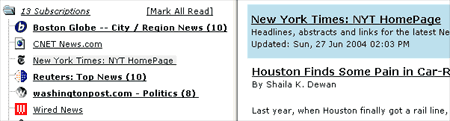
There are many RSS aggregators available. Some are accessed through a browser, some are integrated into email programs, and some run as a standalone application on your personal computer.
How do I find out if a website has an RSS feed?
It is getting more and more common for websites to have RSS feeds. They usually indicate the existence of the feed on the home page or main news page with a link to "RSS", or sometimes by displaying an orange button with the letters "XML" or "RSS". RSS feeds are also often found via a "Syndicate This" link. Text "RSS" links sometimes (there are lots of variations) point to a web page explaining the nature of the RSS feeds provided and how to find them. The buttons are often linked directly to the RSS feed file itself.Once you know the URL of an RSS feed, you can provide that address to an RSS aggregator program and have the aggregator monitor the feed for you. Many RSS aggregators come preconfigured with a list to choose from of RSS feed URLs for popular news websites.
How is the RSS feed file produced?
Unless you are maintaining a website or want to create your own RSS feed for some other purpose, how the RSS feed is produced should not be of concern and you may skip this section.The special XML-format file that makes up an RSS feed is usually created in one of a variety of ways.
Most large news websites and most weblogs are maintained using special "content management" programs. Authors add their stories and postings to the website by interacting with those programs and then use the program's "publish" facility to create the HTML files that make up the website. Those programs often also can update the RSS feed XML file at the same time, adding an item referring to the new story or post, and removing less recent items. Blog creation tools like Blogger, LiveJournal, Movable Type, and Radio automatically create feeds.
Websites that are produced in a more custom manner, such as with Macromedia Dreamweaver or a simple text editor, usually do not automatically create RSS feeds. Authors of such websites either maintain the XML files by hand, just as they do the website itself, or use a tool such as Software Garden, Inc.'s ListGarden program to maintain it. There are also services that periodically read requested websites themselves and try to automatically determine changes (this is most reliable for websites with a somewhat regular news-like format), or that let you create RSS feed XML files that are hosted by that service provider.
Tying it all together
Here is a diagram showing how the websites, the RSS feed XML files, and your personal computer are connected: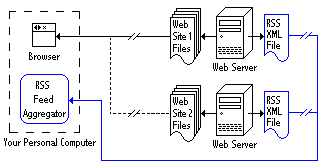
The diagram shows a web browser being used to read first Web Site 1 over the Internet and then Web Site 2. It also shows the RSS feed XML files for both websites being monitored simultaneously by an RSS Feed Aggregator.
Other uses
In addition to notifying you about news headlines and changes to websites, RSS can be used for many other purposes. There does not even have to be a web page associated with the items listed -- sometimes all the information you need may be in the titles and descriptions themselves.Some commonly mentioned uses are:
- Notification of the arrival of new products in a store
- Listing and notifying you of newsletter issues, including email newsletters
- Weather and other alerts of changing conditions
- Notification of additions of new items to a database, or new members to a group
One RSS aggregator is all that you need to read all of the RSS feeds, be they headlines, alerts, changes, or other notifications. RSS is shaping up to be a very popular and useful means for communicating.
Comments
Post a Comment
Add your comment here.